
The Technologies Powering Modern Humanoid Robots
Take apart a humanoid robot and the mystery mostly disappears. What’s left is a set of concrete systems — sensing, movement, computing, and code — and for students in Canton, MI, learning how those systems connect is where robotics stops being a spectator activity.
What’s Really Going On Inside a Humanoid Robot?
A humanoid robot may look like one seamless machine, but it’s really several distinct technologies operating as a team. Beneath the outer shell are sensors, motors, processors, and software constantly exchanging information, each one responsible for a specific piece of the job so the robot as a whole can sense, decide, and move.
The Core Technologies at Work
Software and Programming Frameworks — Where the Logic Lives
None of the hardware in a humanoid robot does anything useful without software to direct it. Frameworks like ROS 2 (Robot Operating System) give developers a standardized way to connect sensors, actuators, and computing hardware into a single coordinated system. Students generally write this logic in Python or C++, two languages used well beyond robotics, so the programming skills learned here transfer directly into other technical work.
One thing students notice quickly is how immediate the feedback is. Adjust a few lines of code, and the robot’s behavior shifts right along with it — a much tighter loop than most classroom coding assignments provide, which tends to make debugging feel more like problem-solving than punishment.
Sensors — Giving a Robot Something to Go On
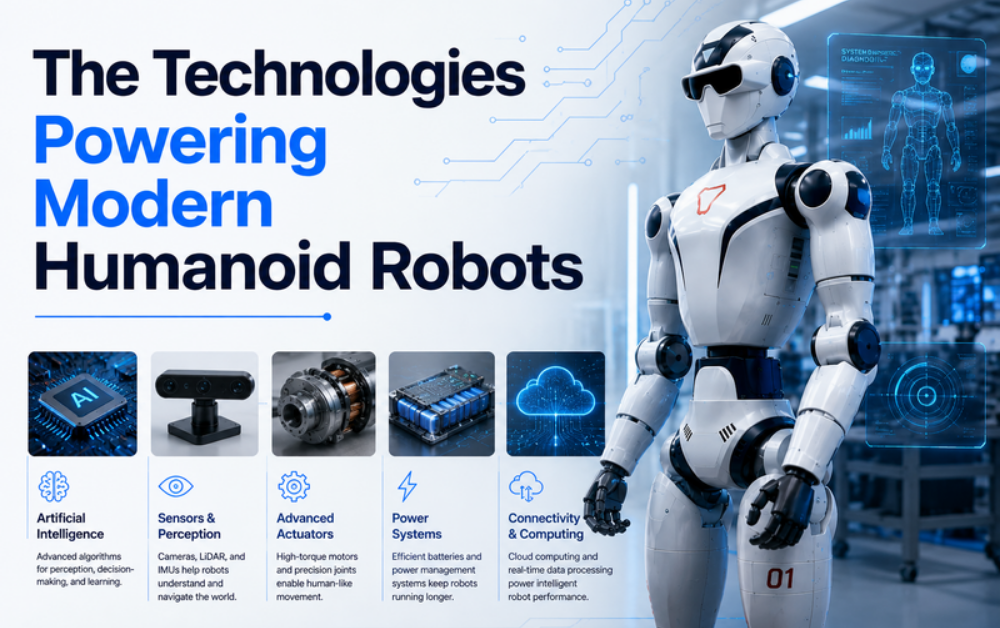
A humanoid robot doesn’t have eyes or ears in any biological sense, so everything it “knows” about its surroundings comes from sensors. Cameras and depth sensors let it judge shape and distance, 3D LiDAR helps it build a working map of the space it’s in, and inertial sensors keep track of balance and orientation. None of these tell the whole story on their own — it’s the combination that gives the robot a usable picture of the world.
This is one of the more challenging parts of the system to design well, because each sensor has blind spots. A camera can misjudge distance in low light; an inertial sensor can’t tell you what object is in front of the robot. Part of learning robotics is learning how engineers combine these imperfect data sources into one reliable read on the environment.
Power Systems — Keeping Everything Running
None of the previous systems matter if the robot can’t stay powered. Battery technology and power management determine how long a humanoid robot can operate without a tether, balancing the energy needs of its motors, sensors, and processors against the practical requirement of running long enough to be useful before needing a recharge.
This trade-off shows up across nearly every field of robotics, not just humanoid platforms. Every upgrade to motor strength or processing power increases energy demand somewhere else in the system, which means power management ends up shaping almost every other design decision on the robot.
Actuators and Motors — Turning Signals Into Motion
Perceiving the world is only useful if the robot can also respond to it, and that’s the job of actuators and motors. These components convert an electrical signal into physical movement, whether that’s a small adjustment in a finger joint or the coordinated push needed for a full walking step. A humanoid platform typically has dozens of these motorized joints, giving it the range of motion — often described in terms of degrees of freedom — needed for tasks like walking, reaching, and grasping.
The tricky part isn’t any single motor — it’s getting all of them to work together. Taking one step forward means several joints adjusting in sync, in real time, to keep the robot balanced. That coordination challenge is where a basic programming exercise turns into something genuinely demanding.
Onboard Computing — Where the Decisions Happen
Every piece of sensor data eventually has to be processed somewhere, and it has to happen quickly. Onboard computing hardware handles this load, running camera feeds, sensor readings, and motor commands through the system simultaneously so the robot can respond without a noticeable delay. Artificial intelligence plays a role here as well, helping the robot recognize objects and make sense of its surroundings on the fly.
Timing is what makes or breaks this layer of the system. If processing lags even slightly behind what the sensors are reporting, the robot’s response arrives a beat too late — enough to misjudge an object’s position or lose its footing. Fast, efficient onboard processing is what keeps perception and action working in sync.
A Common Misconception Worth Clearing Up
It’s tempting to lump everything a humanoid robot does under the single label “AI,” but that oversimplifies what’s actually going on. A humanoid robot functions more like a coordinated team of specialists — sensing, computing, movement, and power each doing a narrow, well-defined job and handing information off to the next. Artificial intelligence contributes meaningfully, especially in perception and decision-making, but it’s one piece of a larger system, not the whole system. Recognizing that distinction is often what turns a robot from something mysterious into something a student can actually picture building.
Why These Technologies Matter Beyond Robotics
What makes this worth a student’s time isn’t just the robot itself. It’s the fact that a single humanoid platform touches mechanical engineering, computer science, and applied math all at once, which makes it an unusually efficient way to build a broad technical foundation early.
Learning These Technologies at iCode Canton
Rather than treating these topics as lecture material, iCode Canton builds the curriculum around direct practice. Mentors walk small groups through the Unitree R1 EDU platform, where the sensors, motors, and code covered in class become something students can physically test and adjust. This program is available at select campuses offering the Humanoid Robotics track, including Canton, MI. Learn more about our College Accelerator Program or visit our
iCode Canton, MI campus page for local class schedules and enrollment details.
Frequently Asked Questions
Does my student need coding experience before starting this program?
No prior coding experience is required. Mentors introduce programming concepts alongside the robotics hardware, so students build both skill sets together from the start.
What robot platform does the program use?
Students work with the Unitree R1 EDU platform — a 25kg humanoid robot with up to 40 degrees of freedom, an NVIDIA Jetson Orin processor running at 100 TOPS, and 3D LiDAR paired with depth cameras, all programmed in Python and C++ through ROS 2.
How does this differ from a standard coding or STEM class?
The biggest difference is feedback. Instead of code that only runs on a screen, students write logic that directly controls a physical robot’s sensors and movement, so they see immediately whether their thinking was correct.
What age or skill level is this program built for?
The Humanoid Robotics track is designed for students ready for more advanced, project-based work. Mentors at your local campus can help place a student at the appropriate level.